GPS time tracking, crew scheduling & work orders for every field service team.
No matter what trade you're in — Boncks gives you one-tap GPS clock in, automatic overtime, dispatch-ready work orders with directions, professional invoicing & quotes, push notifications, and payroll exports in one mobile-first app your crew will actually use.
- No credit card
- Cancel anytime
- Built for crews of 2–200
Already on a Boncks team? Sign in here →
Trusted by field service teams in
Everything your field crew needs in one app
Stop stitching together a timesheet app, a dispatch board, and a maps tab. Boncks does it all from one mobile screen.
One-tap GPS clock in
Big button, big timer, GPS stamped — works on any phone, no app to install.
Automatic OT & DT
Daily and weekly overtime, double-time, and your custom multipliers — calculated for you.
Teams & team leaders
Group employees into crews and put exactly one Team Leader in charge of dispatch.
Up to 3 locations
Name each job site or branch, assign employees, and filter your dashboard by location.
Work orders + directions
Create jobs, assign to a team or person, attach a job address, and your crew taps to navigate.
Auto-dispatch work orders
Flip one switch — new jobs auto-assign to the closest clocked-in crew or individual that isn't already busy.
Customer 'On my way' & review SMS
One-tap text to the customer when you're rolling — and a one-tap review request when the job's done. Templates editable in Settings.
Live crew map
Every employee shows their name on the map. Work order pins show pending and in-progress jobs. Follow mode, filters, and real-time GPS updates.
Push notifications
Your crew gets instant alerts when a new job is assigned or they're added to a team — no refreshing.
Works like an app
Install to home screen in one tap. Wake lock keeps GPS active. No App Store needed.
Shift scheduling
Set weekly work days and hours for each employee. They see exactly when they're expected on site.
Day-off requests
Employees request time off from their phone. You approve or reject with one tap.
In-app team messaging
Leaders message one member or the whole crew. Members reply directly to their leader — all in-app.
Real-time notifications
Instant in-app alerts for new messages, support tickets, and emails. Never miss what matters.
Office click-to-call
Your office number displayed on every employee's dashboard with a one-tap call button.
Accounting & tax export
Track income, expenses, and payroll. Download a tax-ready ZIP with P&L, payroll summary, CSVs, and receipts.
Payroll-ready CSV
Export regular, OT and DT hours by employee — drop it straight into QuickBooks, Gusto or ADP.
Professional invoicing
Create, send & track branded invoices from your own email. Multiple templates, PDF generation, and payment tracking.
Quotes & estimates
Send professional quotes that convert to invoices with one click. Track status from sent to accepted.
Recurring invoices
Automate monthly billing with scheduled invoice generation. Set frequency, pause, and resume anytime.
Customer portal
Clients view invoices via a unique link, download PDFs, and pay online through your payment link.
Overdue reminders
Automated email reminders for unpaid invoices. Control frequency, max reminders, and send manual follow-ups.
Invoicing analytics
Revenue trends, collection rates, average days to pay, and overdue alerts — all in one dashboard.
Organize your crews. Put one leader in charge.
Create as many teams as you need, drop employees in, and assign exactly one Team Leader per team. Leaders can dispatch and close out jobs from their phone — without giving them admin access to everything else.
- One Team Leader per team — no confusion over who's in charge.
- Each employee belongs to one team at a time.
- Leaders can see their crew, change job statuses, and get directions.
- Admins keep full control over who's on which team.
Team
Crew A — North Side
Manage up to 3 locations from one dashboard.
Name each job site or branch office, give it an address, and assign employees. The location picker in the admin header filters timesheets, schedules, work orders, and reports — so you see exactly one site at a time. Your first location is created during signup.
- Up to 3 named locations per company.
- Each location has a name and full address.
- Assign employees to a location during invite or anytime after.
- One-click location picker filters the entire admin dashboard.
Location
Team Alpha
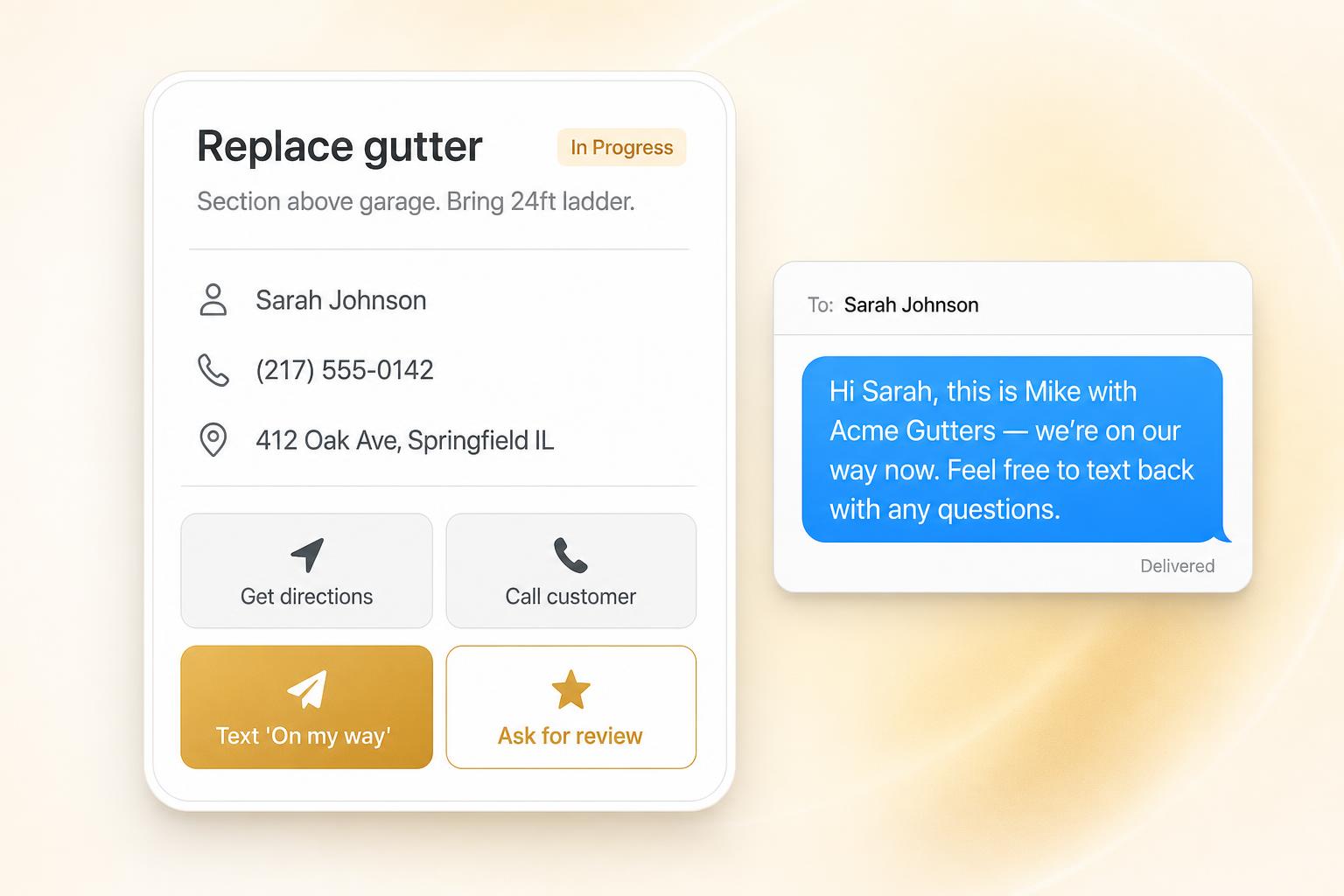
Replace gutter
In ProgressSection above garage. Bring 24ft ladder. Customer home after 9am.
Sarah Johnson
412 Oak Ave, Springfield, IL 62704
Photos
Team task
Dispatch work orders to any job site in seconds
Create a work order in seconds. Add a job address and every team member sees a one-tap Get directions button that opens Google Maps on Android, Apple Maps on iPhone — no copying addresses around.
- Assign to a whole team OR one specific employee.
- Track status: Pending → In Progress → Completed.
- Job address opens native turn-by-turn navigation.
- Notes are required to mark a job complete — the office always knows what was done.
- Crew attaches before & after photos straight from the job — straight to the office.
- Ask for review unlocks once a job is marked Completed — open Completed jobs to send the link.
- Only the team leader (or an admin) can mark it done.

New jobs auto-assigned to the closest crew.
Flip one switch in Settings. Every new work order is instantly assigned to the nearest currently clocked-in employee or team that isn't already on a job — using live GPS. Need to assign manually? Just leave it off.
- Picks the closest team or individual — whichever is nearer.
- Skips anyone off the clock or already on an in-progress job.
- One-tap company-wide toggle in Settings.
- Falls back to manual with an alert when nobody's available.
Text customers "On my way" — and ask for reviews — in one tap.
Workers tap one button on the work order to open their phone's Messages app with a pre-written text already filled in. When the job's done, tap again to send a thank-you with your Google review link. No third-party SMS service, no per-text fees.
- One-tap "On my way" SMS to the customer.
- Auto-fills employee name, company name & customer name.
- "Ask for review" button after job completion with your review link.
- Templates fully editable in Settings — write it your way.
Set the schedule. Let your crew request days off.
Stop texting "what time do I start?" Set each employee's weekly schedule once — they see it on their phone with real dates. When they need a day off, they request it right from the app and approved days show directly on their schedule.
- Weekly schedule shows actual dates with week navigation.
- Approved days off appear directly on the schedule grid.
- Day-off requests with approve / reject workflow.
- Today's shift highlighted automatically on the employee's phone.
Weekly schedule
Marcus Reed
Team Alpha
3 members
Heading to 412 Oak Ave now. Everyone check in when you arrive.
8:12 AMOn site. Starting prep.
8:24 AMGreat. Sara, bring the extra ladders from the truck.
8:26 AMGot it, on my way!
8:28 AMKeep your crew connected with in-app messaging
No more group texts or missed WhatsApp messages. Team leaders can message individual members or broadcast to the whole crew — and members reply directly to their leader. Everything stays organized in one place with real-time delivery.
- Leaders send to one person or broadcast to the entire team.
- Team members message their leader directly — no cross-talk.
- Messages appear instantly with real-time streaming.
- Notification bell shows unread count across the app.
- Office phone number displayed with click-to-call on every dashboard.
Built-in bookkeeping. One-click tax export.
Track every dollar in and out — income, expenses, and payroll costs auto-calculated from your timesheets. When tax season arrives, download a single ZIP with PDFs, CSVs, and receipt images organized by month. Hand it to your tax preparer and you're done.
- IRS-aligned chart of accounts — 25+ categories pre-seeded.
- Receipt uploads attached to every transaction.
- Payroll auto-calculated from employee timesheets.
- On-screen P&L, Balance Sheet, Payroll & Expense reports.
- One-click ZIP: PDFs + CSVs + receipts for your tax preparer.
Accounting
Acme Contracting · 2026
Recent Transactions
- -$324.50ABC SuppliesMay 2, 2026 · Office Supplies
- +$4,800.00Johnson ResidenceMay 1, 2026 · Service Revenue
- -$6,120.00Payroll — Week 18Apr 28, 2026 · Payroll & Wages(Payroll)
- -$892.30Home DepotApr 25, 2026 · Materials & Supplies
Tax Package Ready
PDFs · CSVs · Receipts · README
Get paid faster with professional invoicing
Send branded invoices and quotes from your own email. Automate billing, track payments, and manage customers — all included.
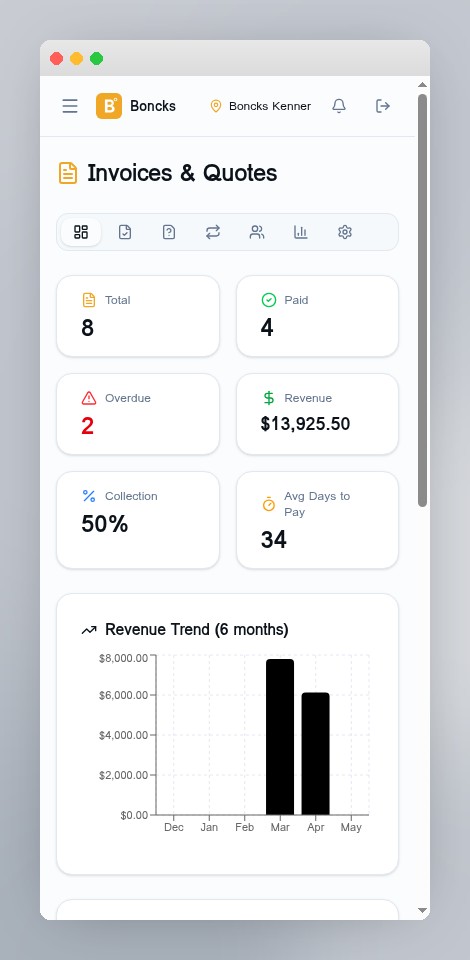
Invoicing Dashboard
Revenue trends, collection rates, overdue alerts, and KPI widgets — all at a glance.
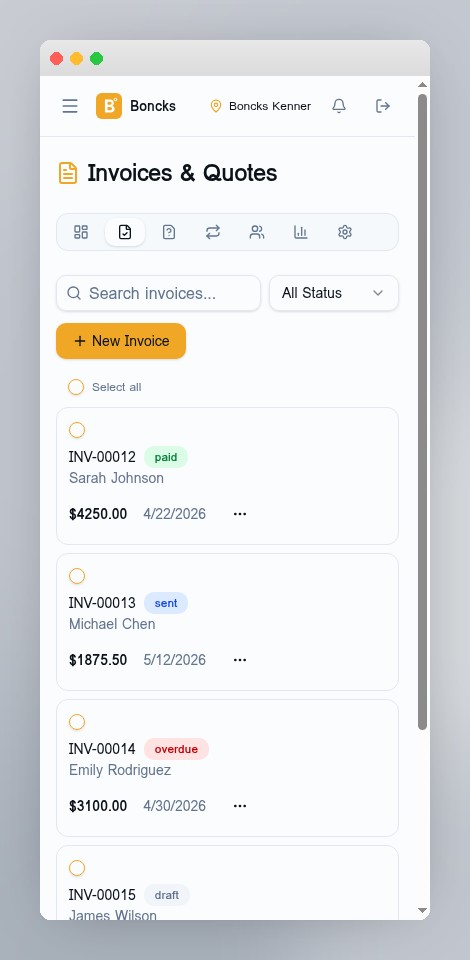
Professional Invoices
Branded invoices with your logo, multiple templates, PDF generation, and online payment links.
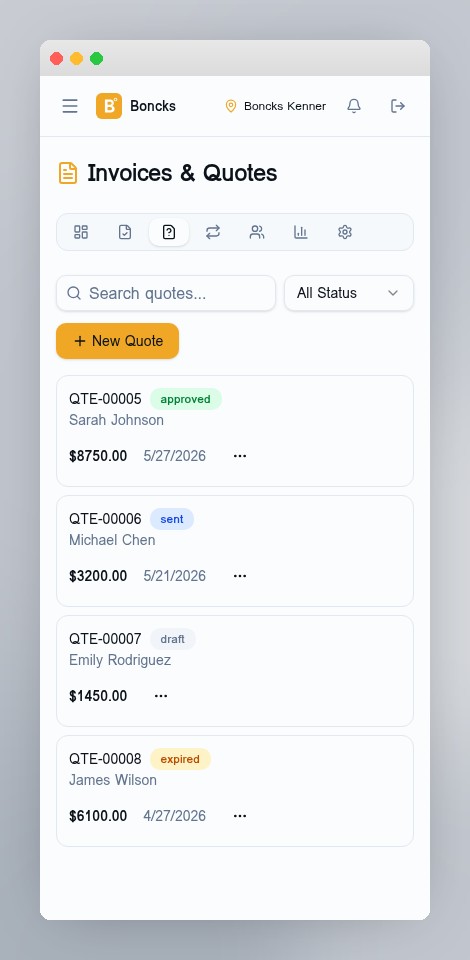
Quotes & Estimates
Send professional quotes that convert to invoices with one click. Track acceptance in real time.
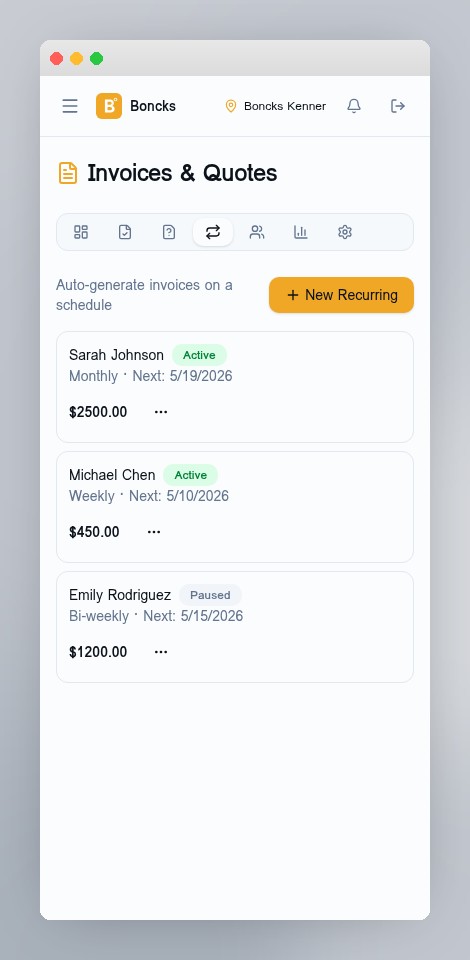
Recurring Invoices
Automate billing with scheduled invoices — weekly, monthly, quarterly, or yearly.
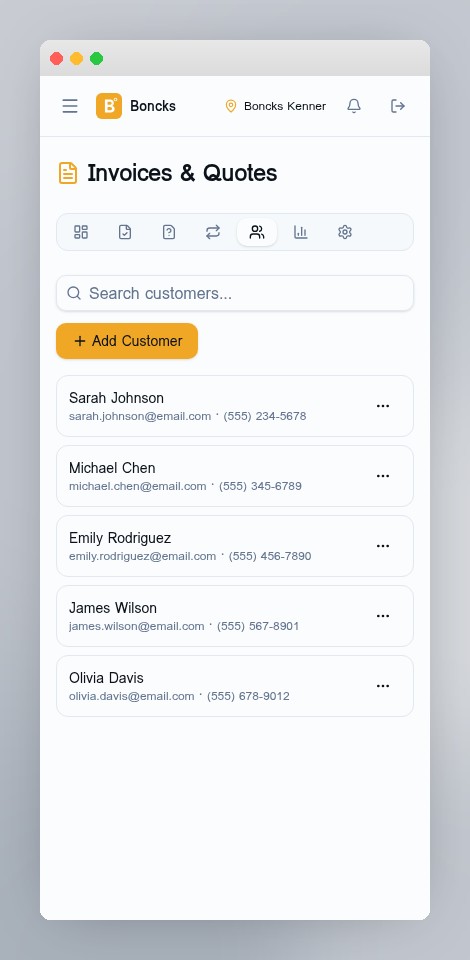
Customer Management
Customer profiles, invoice history, statements, payment tracking, and email logs.
Screenshots shown in mobile view. For full-featured company management, the desktop experience offers expanded dashboards, tables, and controls.
Invoices & Quotes
- Create professional invoices with line items, tax & discounts
- Send quotes that convert to invoices with one click
- 3 templates: Classic, Modern, and Compact
- Auto-generate and download PDF invoices
- Send directly from your business email via SMTP
- Customer portal — clients view & pay via unique link
Automation & Analytics
- Recurring invoices on any schedule (weekly to yearly)
- Automatic overdue email reminders with configurable intervals
- Revenue trend charts and collection rate tracking
- Customer statements with running balances
- Multi-currency support (20+ currencies)
- Payment terms, late fees & partial payment tracking
Up and running in 10 minutes
No setup calls. No training videos. If you can text, you can use Boncks.
- 1
Invite your crew
Add employees by email. They sign up on their phone in under a minute.
- 2
They clock in from their phone
One big button, GPS stamped. Live timer shows hours for the day and the week.
- 3
You export payroll & track jobs
Approve edits, dispatch work orders with directions, export a payroll-ready CSV.
Lock in $9.99/mo before it's gone.
Price increasing to $19.99/mo soon. Sign up now and keep $9.99/mo forever.
Lock in this rate — it won't last.
- Unlimited employees
- GPS-verified clock in & out
- Automatic overtime & double-time
- Teams & team leaders
- Up to 3 company locations
- Work orders with one-tap directions
- Auto-dispatch to nearest available crew
- Customer "On my way" & review request SMS
- Required completion notes on every job
- Before & after job photos (worker uploads, company sees)
- One-tap review request — unlocked after job completion
- Live crew map with clustering & follow
- Push notifications
- Shift scheduling & day-off requests
- In-app team messaging
- Real-time notifications
- Office click-to-call
- PWA install — works like a native app
- Payroll-ready CSV exports
- Built-in bookkeeping & tax export
- Professional invoicing & quotes
- Recurring invoice automation
- Customer portal & statements
- Overdue email reminders
- Invoicing dashboard & analytics
- Multi-currency support
- Timesheet edits & approvals
- Email support
No credit card required. Price locks in at $9.99/mo when you subscribe. Payments processed securely through PayPal.
See how much your company saves with Boncks
Drag the slider to match your crew size and watch the savings add up.
vs. Clockify with 25 employees
Calculations based on publicly available pricing. Actual costs may vary by plan and add-ons.
More features. One flat price. No per-user fees.
Boncks gives you everything the big players charge extra for — at a fraction of the cost.
| Feature | You're hereBoncks | Connecteam | Buddy Punch | Clockify | Homebase |
|---|---|---|---|---|---|
| Price | $9.99/mo flat | From $29/mo | $4.49/user + $19 base | $5.49/user/mo | $20/location/mo |
| Unlimited employees | |||||
| No per-user fees | |||||
| GPS clock-in | |||||
| Automatic OT & DT | |||||
| Teams & team leaders | |||||
| Multi-location support | |||||
| Work orders with directions | |||||
| Auto-dispatch to nearest crew | |||||
| Customer 'On my way' & review SMS | |||||
| Before & after job photos | |||||
| Required completion notes | |||||
| Review request gated to completed jobs | |||||
| Live crew map | |||||
| Push notifications | |||||
| Shift scheduling | |||||
| Day-off requests | |||||
| In-app team messaging | |||||
| Real-time notifications | |||||
| Office click-to-call | |||||
| PWA (works like an app) | |||||
| Built-in bookkeeping | |||||
| One-click tax export | |||||
| Payroll CSV export | |||||
| Professional invoicing | |||||
| Quotes & estimates | |||||
| Recurring invoices | |||||
| Customer portal | |||||
| Overdue reminders | |||||
| Customer statements | |||||
| Multi-currency invoicing |
Competitor data based on publicly available pricing pages as of 2026. Prices may vary by plan and region.
Ready to run your field service crew smarter?
14 days free. No credit card. Set up in minutes — your team will be clocking in by lunch.